Have you noticed how marketing has changed in the last few years? What worked before does not always work now. Search behavior has shifted. Ads cost more. Data rules every decision. So, the real question is simple. Are you using the right Google marketing tools to stay ahead?
Many people search for answers like these. Which Google tools are best for marketing? Are free tools enough? How do we track website traffic correctly? Which tool helps with ads? How do we measure results without confusion?
Understanding Google Marketing Tools
Google marketing tools are platforms created by Google to help businesses promote products, track performance, understand customers, and improve online visibility. They collect data from search, ads, websites, and user behavior. They then turn that data into insights we can use.
These tools matter because they help us make better decisions. Instead of guessing, we act on real numbers. Instead of hoping campaigns work, we measure them.
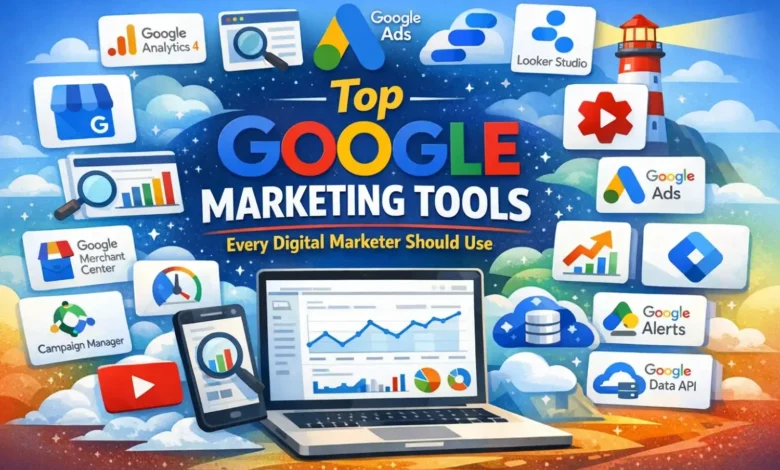
We will now explain these 15 Google marketing tools every marketer should use and how each one helps in real life in this article –
Key Takeaways
- Track real user behavior with GA4
- Improve search visibility using Search Console
- Run high intent campaigns with Google Ads
- Plan smarter content with Keyword Planner data
- Manage website tracking through Tag Manager
- Visualize marketing performance in Looker Studio
- Identify rising topics using Google Trends
- Increase product exposure via Merchant Center
- Strengthen local presence with Business Profile
- Improve website performance using PageSpeed Insights
Why Google Marketing Tools Directly Impact Your Results?
If you run a business, manage campaigns, or promote services, these tools affect you directly. They help you see where your traffic comes from. They show what people search before buying. They tell you which ads bring sales and which one’s waste money.
Without proper tools, you rely on assumptions. With Google marketing tools, you rely on data. That difference changes outcomes. It helps you reduce cost, improve targeting, and grow steadily.
The truth is simple. Your competitors are likely using these tools already. When you understand them, you gain control over your marketing decisions instead of reacting blindly.
Top 15 Google Marketing Tools Every Marketer Should Use
Below are the exact 15 Google marketing tools that help with traffic, ads, SEO, research, and performance tracking. Each one solves a specific problem.
Tool 1 – Google Analytics 4
Google Analytics 4 helps you understand what people actually do on your website or app. You can see how they arrive, what pages they visit, how long they stay, and whether they complete important actions like signing up or buying something.
In 2026, GA4 is the main analytics system. The old Universal Analytics is gone. If you are not using GA4 properly, you are basically running marketing without data. That is risky.
The real value of GA4 is behavior tracking. It does not just show traffic numbers. It shows events. For example, who clicked a button, who watched a video, or who abandoned a cart. This helps you fix weak areas and improve conversions.
Tool 2 – Google Search Console
It shows how your website performs in organic search. You can see the exact keywords people used to find you. You can also see impressions, clicks, and average position.

The thing is, SEO without Google Search Console is guesswork. This tool gives you direct information from Google. It tells you which pages are indexed and which ones have issues.
If a page suddenly drops in traffic, Search Console helps you investigate. Maybe there is a technical error. Maybe search intent changed. Either way, you get clarity instead of confusion.
Tool 3 – Google Ads
It allows you to place your business directly in front of people searching for your offer. You can run search ads, display ads, YouTube ads, and shopping campaigns.
In 2026, competition is high. Organic traffic takes time. Google Ads gives faster visibility. You control your budget, audience, and bidding strategy.
But here is the catch. Running ads without tracking and strategy wastes money. When connected with GA4 and conversion tracking, Google Ads becomes a powerful growth engine.
Tool 4 – Google Keyword Planner
It helps you find what people are searching for. It shows estimated search volume and competition levels.
Many people think it is only for paid ads. That is not true. SEO content planning becomes easier when you know real search demand.
Instead of guessing blog topics, you create content around keywords that people already search for. That increases your chances of ranking and getting traffic.
Tool 5 – Google Tag Manager
It lets you manage tracking codes without changing your website code every time. You can add analytics tracking, conversion pixels, and remarketing tags from one dashboard.

This reduces dependency on developers. It also reduces mistakes because everything is organized in one place.
For marketers who run campaigns regularly, GTM saves time and keeps tracking clean and accurate.
Tool 6 – Google Looker Studio
It helps you build visual dashboards using data from GA4, Google Ads, Search Console, and more.
Instead of logging into five platforms daily, you can see everything in one report. That makes decision making easier.
If you work with clients or teams, this tool improves communication. You show performance clearly instead of explaining spreadsheets.
Tool 7 – Google Trends
It shows how interest in a topic change over time. You can compare search terms and check regional interest.

This is very useful for seasonal businesses. For example, if searches increase every October, you can plan campaigns earlier.
It also helps spot rising topics. If interest is growing, you can create content before competitor’s notice.
Tool 8 – Google Business Profile
It helps your business appear in local search results and Google Maps.
When someone searches near me, local listings often appear first. If your profile is optimized with reviews, photos, and updated details, you increase trust.
For local businesses like clinics, restaurants, or service providers, this tool directly affects walk ins and calls.
Tool 9 – YouTube Studio
It helps you manage and analyze your YouTube content. You can see watch time, audience retention, and subscriber growth.

Video marketing continues to grow in 2026. But not every video performs well.
YouTube Studio shows exactly where viewers stop watching. That helps you improve future videos and keep people engaged longer.
Tool 10 – Google Merchant Center
It connects your product listings to Google Shopping results.
If you run an ecommerce store, this tool allows your products to appear with price, image, and reviews directly in search results.
This attracts high intent buyers. People searching for products often already want to purchase. Merchant Center increases your visibility at that moment.
Tool 11 – Google Campaign Manager
It helps manage larger and more complex ad campaigns across channels.

It is mainly used by agencies and enterprise teams. It centralizes ad tracking and reporting.
If you run ads across multiple platforms, this tool improves coordination and reporting accuracy
Tool 12 – Google Ads Data API
The Google Ads Data API allows automation of reporting and campaign management.
For large accounts, manual data pulling wastes time. With the API, teams can create automated dashboards and custom reporting systems.
This improves efficiency and reduces human errors in reporting.
Tool 13 – Google Alerts
It sends notifications when your brand name or selected keywords appear online.
Brand reputation matters. If someone writes about your business, you want to know quickly.
This tool helps monitor mentions and industry topics without manually searching every day.
Tool 14 – Google PageSpeed Insights
It analyzes your website loading speed and performance issues.
Website speed affects user experience and SEO rankings. Slow websites lose visitors quickly.
The tool gives clear suggestions to improve performance. Faster websites usually see better engagement and conversions.
Tool 15 – Google Lighthouse
It audits your website for performance, accessibility, SEO basics, and best practices.

It provides a detailed report with improvement suggestions. This helps you maintain technical quality.
In 2026, user experience and performance are directly connected to search visibility. Lighthouse supports both.
Last Words
Google marketing tools are not just optional platforms. They shape how we plan, execute, and measure campaigns. Each tool serves a different purpose. Some help with traffic tracking. Others improve ads. Some strengthen SEO and research.
The key is not using all tools blindly. It is choosing the right ones for your goals. When we use these tools properly, marketing becomes clear instead of confusing.
Start with the basics like Analytics and Search Console. Then expand based on your needs. The goal is simple. Make informed decisions and grow with confidence.
Google Marketing Tools Frequently Asked Questions (FAQs)
Google Marketing Tools help track results improve campaigns and make smarter decisions based on real data insights.
They show clear data about traffic users and conversions so professionals can improve campaigns quickly.
Google Analytics helps track visitors behavior and website performance in real time easily.
Google Ads helps create targeted ads and reach the right audience at the right time.
Google Keyword Planner helps find search terms people use before creating content or ads.
They provide clear reports about clicks impressions and conversions so marketers understand what is working.
Google Search Console shows website performance and helps fix issues affecting search rankings.
They show which campaigns perform well so professionals stop wasting money on poor results.
They offer reliable data accurate tracking and strong insights that help marketers grow confidently.
Yes, they are simple to use and offer helpful guides for beginners starting digital marketing.
Also Check These