Key Takeaways
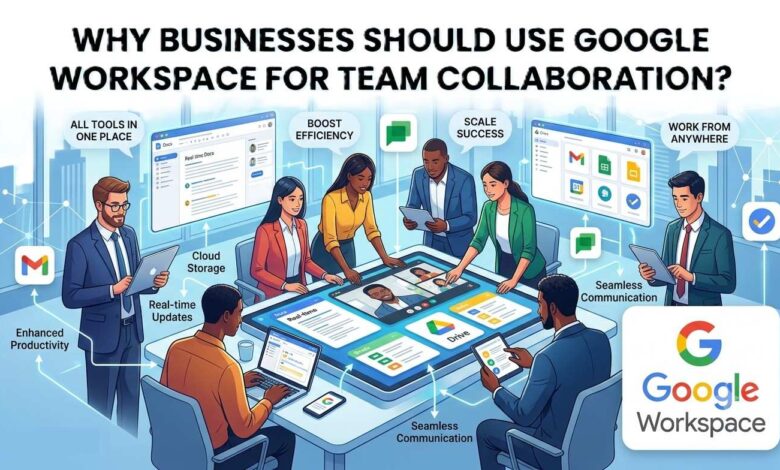
- Google Workspace helps teams collaborate in real time on documents and spreadsheets
- Cloud storage allows employees to access files from anywhere
- Shared document links prevent confusion caused by multiple file versions
- Built in communication tools support remote and hybrid teams
- Automatic saving protects work from unexpected data loss
- Version history helps track edits and restore earlier document versions
- Integrated tools improve workflow efficiency
- External collaboration with clients and partners becomes easier
- Security features protect sensitive business information
- The platform scales easily as teams grow
Have you noticed how modern teams rarely sit in the same office anymore? Some people work from home. Others travel. Many companies hire talent from different cities or even different countries.
So, a simple question comes up. How do teams communicate, share files, and work on the same documents without confusion?
You might be wondering things like these.
- What is Google Workspace?
- How does it help teams collaborate better?
- Is it better than traditional office tools?
- Can small businesses use it easily?
- And most importantly, will it actually make work faster and simpler?
These are practical questions many business owners ask today. The way teams work has changed. Work is no longer limited to office desks and local servers. Teams now rely on cloud tools that allow people to connect and work together in real time.
That is where Google Workspace comes in.
Google Workspace is a cloud-based productivity platform created by Google. It includes tools such as Gmail, Google Docs, Google Sheets, Google Drive, and Google Meet.
These tools allow teams to communicate, create documents, share files, and manage work from one connected system.
Here is how it works –
Instead of storing files on individual computers, everything lives in the cloud. Team members can open the same document at the same time, make edits instantly, and see updates live. There is no need to send multiple file versions through email.
Why does this matter?
Because collaboration is one of the biggest challenges in modern businesses. When teams cannot share information quickly, projects slow down. Miscommunication increases. Work gets duplicated.
Google Workspace solves many of these issues by keeping teams connected in one place.
Let us clearly understand why our clients of digital marketing agency in Delhi uses this for team collaboration and how it improves everyday work –
Why Google Workspace for Team Collaboration Is Important For You?
Whether you run a startup, manage a marketing team, or operate a small business, collaboration tools affect your daily work more than you might realize.
Think about how often your team sends documents, updates spreadsheets, shares reports, or schedules meetings. Without the right system, these simple tasks can create confusion. Different file versions appear. Emails get lost. Important updates are missed.
Google Workspace helps reduce these problems by keeping communication, files, and teamwork organized in one place.
For you and your team, this means less time searching for files and more time actually doing meaningful work.
It also helps businesses stay flexible. Your team can work from the office, home, or anywhere else without losing access to important tools.
Reasons Businesses Use Google Workspace for Better Team Collaboration
Real Time Collaboration Makes Teamwork Faster
One of the biggest advantages of Google Workspace is real time collaboration.
With tools like Google Docs and Google Sheets, multiple people can work on the same document at the same time. Everyone sees changes instantly.
For example, a social media marketing team can edit a campaign plan together during a meeting. Instead of sending updated versions back and forth, everyone contributes in one shared document.
This speeds up teamwork and reduces confusion.
Cloud Storage Keeps Files Accessible Anywhere
It stores files in the cloud through Google Drive.
This means your team does not depend on one computer or office server to access important files.
Imagine a sales manager traveling for a client meeting. They can open proposals, presentations, or spreadsheets directly from their phone or laptop.
This flexibility makes work smoother and prevents delays.
Simple File Sharing Improves Communication
Sharing files in traditional systems often involves email attachments.
The problem is that attachments create many versions of the same document.
It solves this by allowing teams to share one live document link. Permissions can control who can view, comment, or edit.
This keeps everyone on the same page and avoids unnecessary confusion.
Built In Communication Tools Keep Teams Connected
Team collaboration is not just about documents. Communication matters too.
It includes tools like Gmail and Google Meet that help teams stay connected.
Employees can send emails, schedule meetings, and host video calls from the same ecosystem.
For remote teams or hybrid workplaces, this makes communication much easier.
Automatic Saving Prevents Data Loss
Most people have experienced the frustration of losing work because a file was not saved.
It automatically saves every change in the background.
This means your work stays safe even if your computer shuts down or your internet disconnects.
For teams working on important reports or projects, this feature provides peace of mind.
Version History Makes Edits Transparent
When many people edit the same document, tracking changes can become difficult.
It keeps a detailed version history for documents.
This allows users to see who made changes and when those edits happened.
If something goes wrong, earlier versions can be restored easily.
This helps teams maintain clarity and accountability.
Integration Between Tools Improves Workflow
Its tools are designed to work together smoothly.
For example, you can open a Google Docs file directly from Google Drive, attach it to Gmail, or discuss it in a Google Meet meeting.
This integration removes the need to jump between unrelated platforms.
Teams spend less time managing tools and more time focusing on work.
Easy Collaboration With External Partners
Businesses often work with freelancers, agencies, or clients.
It makes external collaboration simple.
Instead of sending files repeatedly, you can share documents with outside partners through secure links.
Permissions can limit editing access or allow only comments.
This keeps projects organized while maintaining control over company data.
Strong Security Protects Business Information
Security is a major concern for any business.
It includes built in security features such as data encryption, two step verification, and administrative controls.
These tools help protect company information and prevent unauthorized access.
Businesses can also manage user permissions and monitor account activity.
Scalable Tools Support Growing Teams
A small team may start with just a few employees. Over time the company grows.
It easily scales with business needs.
New team members can be added quickly with their own email accounts, storage access, and collaboration tools.
This flexibility makes it suitable for startups, small businesses, and large organizations.
Ending Words
Modern businesses rely on teamwork more than ever. But collaboration becomes difficult when tools are scattered, files are hard to find, and communication is slow.
Google Workspace solutions in Delhi helps solve these problems by bringing communication, document creation, and file sharing into one connected system.
For businesses, this means faster teamwork, fewer errors, and better organization. Teams can work together from anywhere without losing productivity.
If your goal is to improve collaboration and simplify daily work, adopting Google Workspace can be a practical step in the right direction.
FAQs
Many businesses choose Google Workspace because it brings email, documents, meetings, and file sharing into one place. Teams can collaborate in real time, stay organized, and work securely from anywhere.
Yes, Google Workspace is a great option for small and growing businesses. It offers professional email, cloud storage, shared documents, and easy collaboration tools without requiring complex IT setup.
Google Workspace helps teams work faster by allowing real-time document editing, easy file sharing, video meetings, and centralized communication. It reduces confusion and keeps everyone aligned on projects.
Startups, remote teams, digital agencies, and growing companies benefit the most from Google Workspace because it supports real-time collaboration, flexible work environments, and simple communication between team members.
Google Workspace includes tools like Gmail, Google Drive, Google Docs, Google Sheets, Google Meet, and Google Calendar. These tools allow teams to communicate, create documents, and manage work together.
Google Workspace works completely in the cloud, so teams can access files, meetings, and shared documents from any device. This makes remote work easier and keeps everyone connected.
Businesses should look for real-time collaboration, secure cloud storage, easy communication tools, and reliable access from anywhere. Google Workspace offers all these features in one integrated platform.
Yes, Google Workspace includes strong security features like data encryption, spam protection, secure login options, and admin controls to help businesses protect emails, documents, and sensitive information.
Businesses can get Google Workspace directly from Google or through certified partners who help with setup, migration, and support to ensure the platform works smoothly for the team.
Companies trust Google Workspace because it is reliable, easy to use, and designed for collaboration. Its cloud-based tools help teams communicate, share files, and manage work efficiently every day.