You publish a new product page. A week later, it’s still nowhere to be found in Google’s index. Meanwhile, your competitor launches something similar the very same day – and it’s already ranking on page one.
What happened?
In years of managing large e-commerce and publisher sites, I’ve watched this exact scenario play out more times than I can count. Teams pour hours into content, design, and outreach, only to have their best work sit invisible to Google for weeks. Nine times out of ten, the culprit isn’t quality. It’s something far less glamorous: crawl budget.
If you’ve never heard the term, you’re not alone – it rarely comes up in beginner SEO guides. But if you run a website with more than a handful of pages, understanding crawl budget can be the difference between content that gets discovered quickly and content that quietly disappears into the crawl queue. This guide breaks down exactly what crawl budget is, why it matters, and – most importantly – how to fix it when it’s working against you.
What Is Crawl Budget?
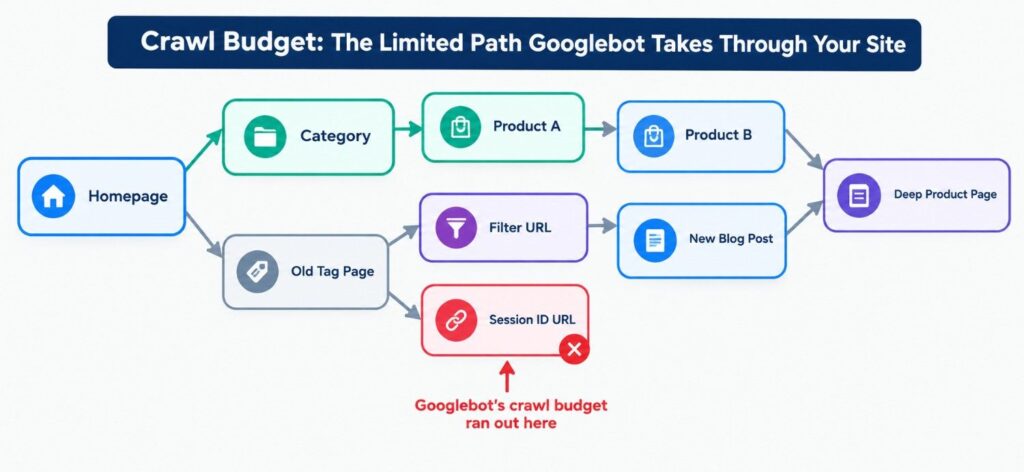
At its core, crawl budget is the number of pages Googlebot will crawl on your website within a given period of time. Google doesn’t have unlimited resources to crawl every page on the internet every single day – so it allocates a “budget” to each site based on a mix of technical capacity and perceived value.
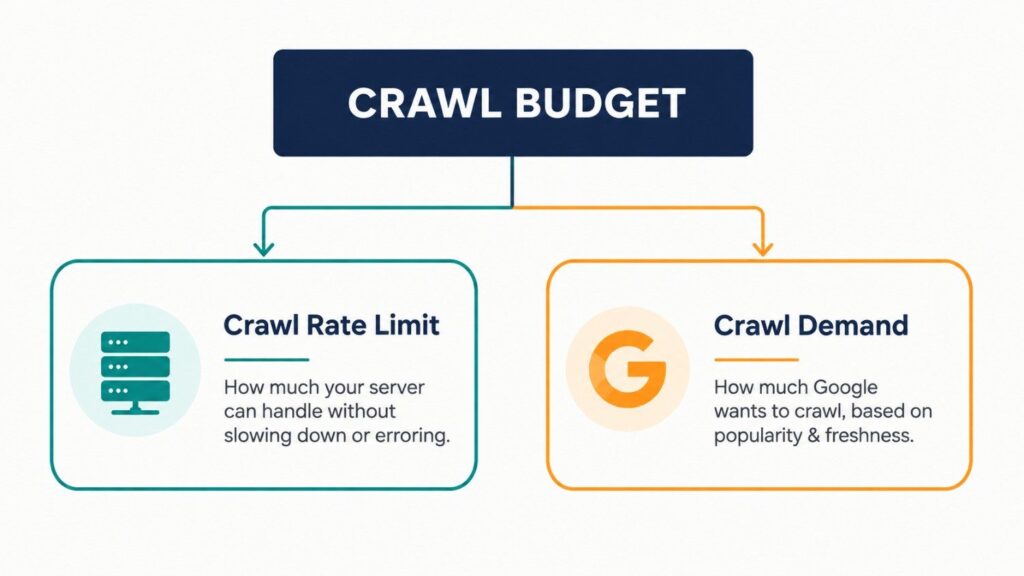
That budget breaks down into two distinct components:
- Crawl Rate Limit – how many requests Googlebot can make to your server without overwhelming it. If your server responds slowly or throws errors, Google backs off automatically to avoid causing problems.
- Crawl Demand – how much Google actually wants to crawl your site, based on factors like how often content changes, how popular pages are, and how important Google judges your site to be.
Here’s the myth worth clearing up early: crawl budget is not a ranking factor. Crawling more pages doesn’t directly boost your rankings. What it does affect is discovery and indexing speed – how quickly Google finds new or updated content and makes it eligible to rank in the first place. A page that’s never crawled can never rank, no matter how good it is.
Why Crawl Budget Matters (Especially for Larger Sites)
Let’s be honest upfront: if you run a small business site with fewer than a thousand pages, crawl budget probably isn’t costing you sleep. Google can typically crawl a site that size in full, regularly, without any special intervention. I’d rather tell you that plainly than have you chase a problem you don’t actually have.
But the calculus changes fast for larger sites – think e-commerce catalogs, marketplaces, publishers, or any business that publishes frequently. On these sites, crawl budget becomes a genuine constraint, and the consequences of ignoring it are real:
- New or updated pages take longer to get indexed, delaying their ability to rank and drive traffic.
- Google may spend its limited crawl budget on low-value pages – filtered URLs, old tag archives, duplicate variations – instead of your money pages.
- Important pages get crawled less frequently, meaning price changes, stock updates, or content refreshes take longer to be reflected in search results.
I’ve seen this play out directly on a retail client’s site: thousands of auto-generated filter URLs were quietly eating crawl budget every week, while newly launched product pages sat uncrawled for over ten days. Once we identified and blocked the filter URLs, new product indexing time dropped to under 48 hours.
What Wastes Crawl Budget? Common Culprits
Before you can fix a crawl budget problem, you need to know what’s causing it. In practice, the same handful of issues show up again and again – particularly on sites built with faceted navigation, dynamic parameters, or legacy URL structures.
Duplicate content & URL parameters
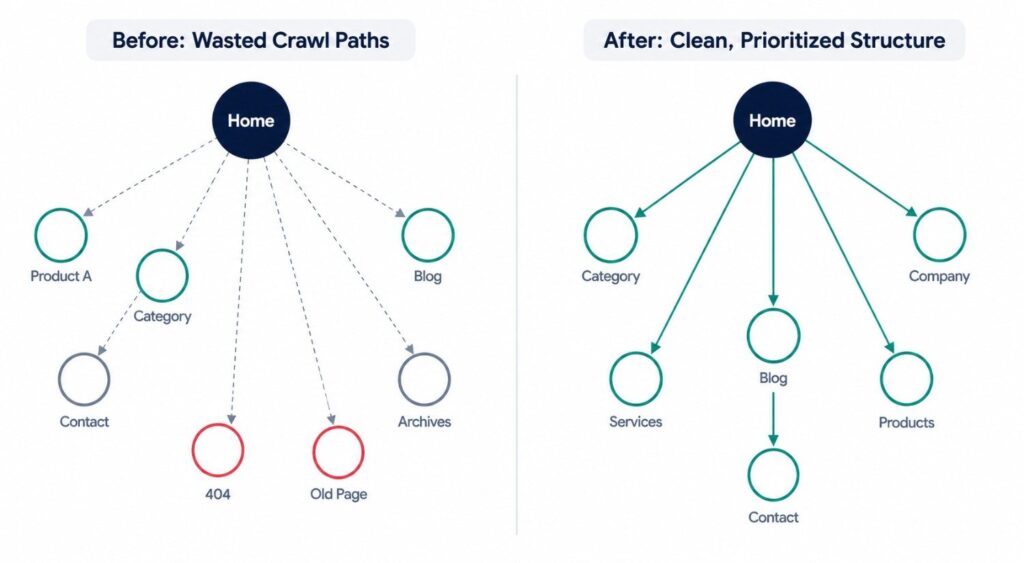
Faceted navigation (filters for size, color, price), sort options, and session IDs can generate thousands of near-duplicate URLs from a single set of products. Each one looks like a “new” page to Googlebot, and each one consumes crawl budget without adding unique value.
Soft 404s, redirect chains, and broken links
Pages that return a “soft 404” (a page that looks empty or says “not found” but returns a 200 status code), multi-hop redirect chains, and dead internal links all force Googlebot to spend extra requests just to arrive at a dead end.
Low-value pages left accidentally crawlable
Staging environments, internal search result pages, thin tag or category pages, and old campaign landing pages often get left open to crawling long after they’ve stopped serving a purpose – quietly draining budget month after month.
How to Check Your Crawl Budget (Step-by-Step)
You don’t need to guess whether crawl budget is an issue for your site – Google gives you the data directly, and server logs fill in the rest.
1. Google Search Console → Settings → Crawl Stats
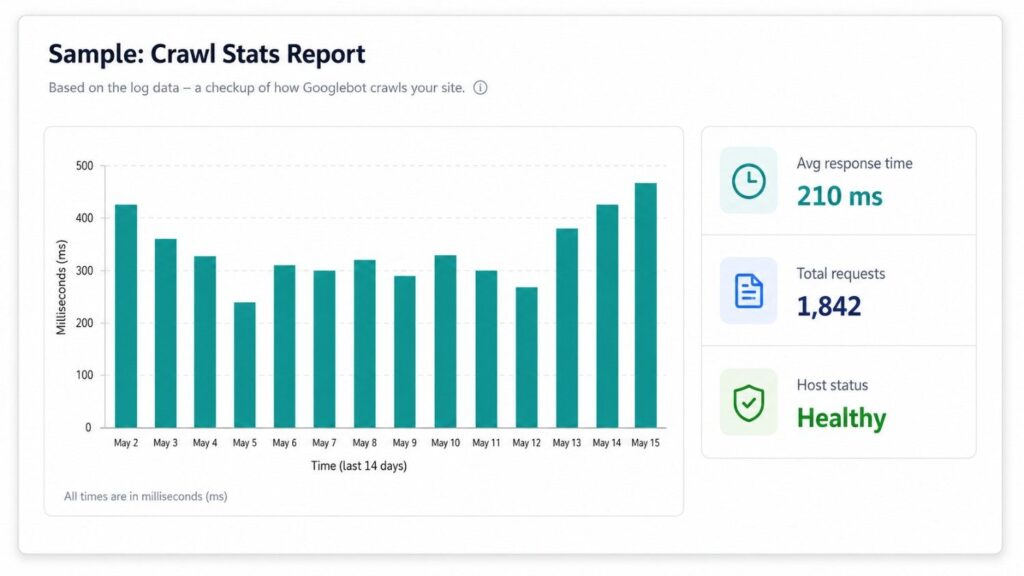
This report shows total crawl requests over time, average server response time, and a breakdown of crawl responses (200s, 404s, redirects, server errors). A sudden drop in requests, or a high proportion of errors, is your first red flag.
2. Server log file analysis
Search Console shows a sample; your server logs show everything. Tools like the Screaming Frog Log File Analyzer let you see exactly which URLs Googlebot is requesting, how often, and whether it’s wasting time on low-value paths you didn’t expect.
3. Key metrics to track
- Total crawl requests – is this trending up, down, or flat over time?
- Average response time – anything consistently above ~500ms can signal a rate-limiting issue.
- Crawl status breakdown – a high percentage of 404s, redirects, or 5xx errors means budget is being wasted before Googlebot even reaches useful content.
How Do You Optimize Crawl Budget?
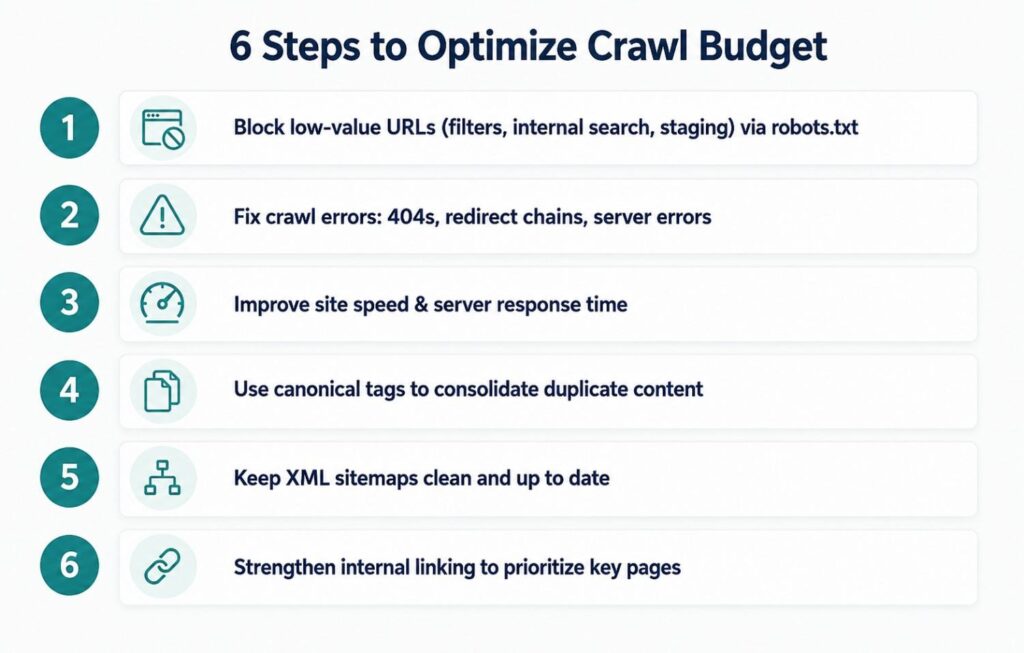
| Quick Answer To optimize crawl budget, block low-value URLs via robots.txt, fix broken links and redirect chains, improve site speed, consolidate duplicate content with canonical tags, and maintain a clean XML sitemap. These steps help Googlebot spend more time crawling your important pages. |
Here’s the full breakdown, in order of typical impact:
- Block or noindex low-value pages. Use robots.txt to prevent crawling of filter URLs, internal search results, and staging environments – these rarely need to be in Google’s index at all.
- Fix crawl errors. Regularly audit for 404s, broken internal links, and redirect chains, and clean them up so Googlebot isn’t spending requests on dead ends.
- Improve site speed and server response time. A faster server means Google can crawl more pages within the same time window – this is one of the most underrated levers available.
- Use canonical tags and consolidate duplicates. Tell Google explicitly which version of a near-duplicate page is the “master” copy, so budget isn’t split across multiple URLs.
- Keep XML sitemaps clean and current. Remove outdated, redirected, or non-indexable URLs from your sitemap – it should only ever list the pages you actually want crawled and indexed.
- Strengthen internal linking. Pages that are linked to more often – and from more important pages – signal higher priority to Googlebot, helping direct crawl demand where it counts.
Crawl Budget Myths vs. Reality
Myth: “More crawling always means better rankings.”
Reality: Crawling and ranking are separate processes. Crawl budget affects whether and how quickly a page gets discovered – not how well it ranks once it’s indexed.
Myth: “Every site needs to actively manage crawl budget.”
Reality: This mostly matters for large, frequently updated, or parameter-heavy sites. Smaller sites are usually crawled fully without intervention.
Myth: “Submitting a sitemap guarantees those pages get crawled.”
Reality: A sitemap is a hint, not a directive. Google still decides what to crawl and when, based on its own assessment of value and demand.
Final Thoughts: Don’t Let Crawl Budget Work Against You
Crawl budget is one of those technical SEO concepts that’s easy to overlook – until it quietly costs you visibility, traffic, and revenue. For smaller sites, it’s rarely a pressing concern. But for growing businesses, e-commerce catalogs, and content-heavy publishers, it’s a lever worth understanding before it becomes a problem rather than after.
The good news: most crawl budget issues come down to a short, fixable list – cleaning up duplicate URLs, resolving crawl errors, speeding up your server, and making sure your sitemap and internal links point Googlebot exactly where you want it to go. Not sure whether crawl budget is quietly holding your site back? Run a crawl audit with a tool like Screaming Frog or your Search Console Crawl Stats report this week – or reach out for a professional technical SEO audit to find out exactly where your budget is being spent.
Frequently Asked Questions
Crawl budget is the number of pages Googlebot will crawl on your site within a given timeframe. It’s shaped by your server’s crawl rate limit and Google’s crawl demand. Sites with thousands of pages feel its impact most; smaller sites rarely need to worry about it.
No. Crawl budget affects discovery and indexing speed, not rankings. A page must be crawled and indexed before it can rank – so while crawling isn’t a ranking factor itself, it’s a prerequisite most SEOs overlook until indexing delays start costing traffic.
Check Google Search Console’s Crawl Stats report for dropping crawl requests or high error rates. In my experience, the clearest sign is new pages taking a week or more to get indexed despite clean technical setups elsewhere.
Yes. A faster server response time lets Googlebot fetch more pages within the same crawl window. I’ve seen indexing speed improve noticeably after teams cut average server response time by even 100–150 milliseconds.
Sitemaps don’t increase your crawl budget, but a clean, updated sitemap helps Google prioritize crawling efficiently. Removing outdated, redirected, or noindexed URLs from your sitemap prevents Googlebot from wasting requests on pages you don’t want indexed.
Yes – significantly. Faceted navigation, sort parameters, and session IDs can generate thousands of near-duplicate URLs. Each one competes for the same limited crawl budget, often pulling Googlebot away from pages that actually deserve attention.
Generally, no. Sites under roughly 1,000 pages are usually crawled fully and regularly without intervention. Crawl budget becomes a real constraint mainly for large e-commerce catalogs, marketplaces, and frequently publishing sites.
It varies by site and depends on crawl demand – how fresh, popular, and authoritative Google judges your content to be. High-authority, frequently updated sites get crawled far more often than static, rarely updated ones.
Yes. Blocking low-value URLs – internal search results, filtered pages, staging environments – via robots.txt stops Googlebot from wasting requests on pages with no ranking value, freeing up budget for your important content.
Start with your Crawl Stats report to identify errors, then fix redirect chains, block low-value URLs, and speed up server response time. In most audits I’ve run, these four fixes resolve the majority of crawl budget waste.